MultiUnlockMDM v1.0.0.1 Latest Version Download (2026) – All-in-One FRP & MDM Free Tool
Table of Contents
MultiUnlockMDM v1.0.0.1 Latest Version Download (2026) – All-in-One FRP & MDM Free Tool
If you are searching for a versatile FRP MDM free tool to handle mobile device management locks, Samsung Knox Guard (KG), Google FRP locks, and advanced ADB operations on Windows, MultiUnlockMDM v1.0.0.1 is a complete servicing solution.
Designed for mobile technicians and repair professionals, this updated 2026 release brings multi-brand modules covering Samsung, Xiaomi, Motorola, OPPO, Google Pixel, and Apple A12–A13 RAMDISK devices—complete with a 10-day free trial activation option.
What is MultiUnlockMDM v1.0.0.1?
MultiUnlockMDM v1.0.0.1 is a multi-brand Windows servicing utility built to bypass MDM restrictions, remove FRP locks, disable OTA updates, and manage system packages via ADB. Unlike single-brand utilities, this free tool combines universal Android ADB scripts, QR provisioning, AT command consoles, and Apple RAMDISK bypass tools into one unified interface.
Features
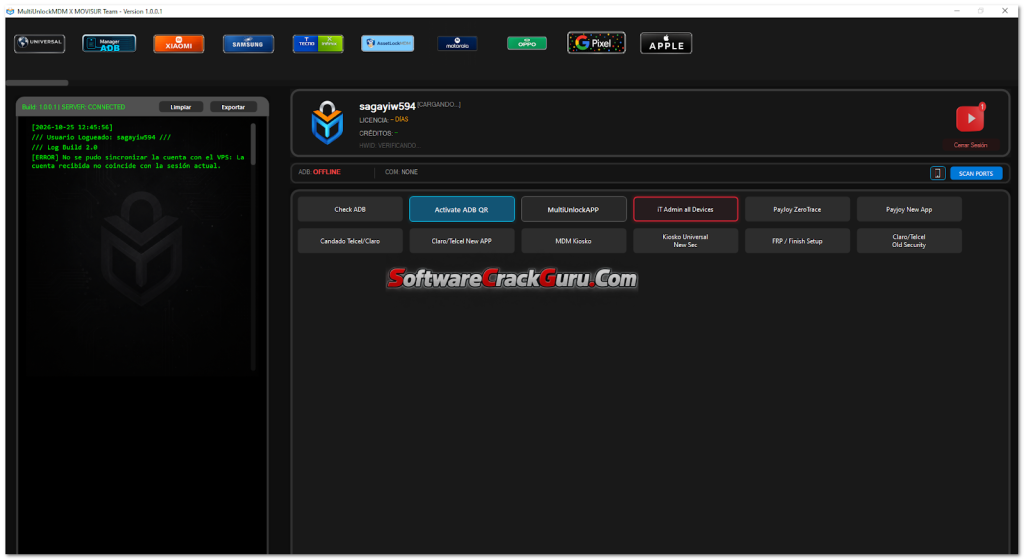
Universal
- Check ADB
- Activate ADB QR
- MultiUnlockAPP
- IT Admin All Devices
- Payjoy Zero Trace
- Payjoy New App
- Candado Telcel/Claro
- Claro/Telcel New APP
- MDM Kiosko
- Kiosko Universal New Security
- FRP / Finish Setup
- Claro/Telcel Old Security
ADB Manager
- System Packages Filter
- User Packages Filter
- Enabled Packages Filter
- Disabled Packages Filter
- Uninstall Packages Filter
- Deshabilitar (Disable)
- Desinstalar (Uninstall)
- Instalar (Install)
- Habilitar (Enable)
- Suspender (Suspend)
- Activar (Activate)
- Detener (Stop / Force Close)
- Borrar Cache (Clear Cache)
- Borrar Datos (Clear Data)
- Mitigar (Mitigate)
- Guardar (Save)
Xiaomi
- Disable Mi Account Zero Trace
- Claro/Telcel Xiaomi Zero Trace
- Kiosko Xiaomi
- Disable OTA Update Xiaomi
- Mi Account (Root)
- Kiosko Zappah!
Samsung
- AT Command Console
- KG Active Permanente (No ADB: Android 14, 15 and 16)
- Activate ADB Security Patch 2022–2023
- Disable OTA Update Samsung
- QR Fix Play Protect KG Bypass
- FIX KG Bypass
- Activate ADB QR
- Activate ADB New APK
- KG ROOT New
- Claro/Telcel Root
- Disabled Leyenda (KG Bypass)
- (ADB) KG Bypass 2024–2025
- KG Android 14 All Security
- KG Active 01
- Disable Knox KG Root
- New KG Magisk
- Fake IMEI Root
- Enable ADB Android 16 New
- Erase FRP Android 16
TELTRI
- Security Plugin Method 1 Server
Motorola
- Disable OTA Update Moto
- White Screen Moto Kiosko
- Claro/Telcel Root
- Disabled OTA Root
- Kiosko (PAKS) Root
OPPO
- White Screen OPPO
- White Screen OPPO New Security 2
- Disable OTA Update OPPO
Google Pixel
- SIMLock Google Pixel
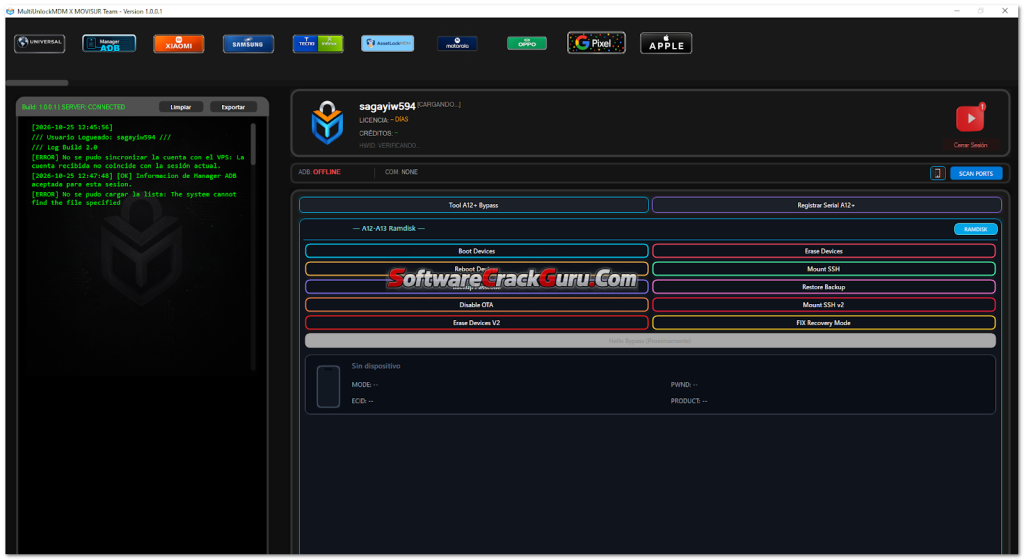
Apple A12–A13 RAMDISK Bypass Module
- Boot Devices
- Reboot Devices
- Backup Passcode
- Restore Backup
- Disable OTA
- Erase Devices
- Erase Devices V2
- Mount SSH
- Mount SSH V2
- FIX Recovery Mode
- Registrar Serial A12-
What’s New in MultiUnlockMDM v1.0.0.1 (Changelog)
- Added KG Active Permanente without ADB for Android 14, 15, and 16 (supports security patches up to 01-01-2026).
- Added Remote ADB Mirror to control devices remotely via PC.
- Added AssetLockMDM v2.0 and IT Admin All Devices (now stable across all security versions).
- Fixed Apple A12–A13 RAMDISK boot errors and added Factory Reset RAMDISK support.
- Improved Background Processing: Moved ADB tasks to background threads to prevent UI freezing and added auto-update support.
- VIP & GOLD Account Tiers: Added HWID reset support (up to 7 times per 24 hours for VIP users).
How to Install & Activate MultiUnlockMDM v1.0.0.1
Follow these step-by-step instructions to set up and run this FRP MDM free tool:
- Download & Extract Main Archive: Download the package from the links below and extract
MULTIUNLOCKTOOL_GSMYOGESH.rarusing WinRAR or 7-Zip. - Extract the Installer: Open the folder and extract
Setup_MultiUnlockMDM-1.0.0.1.rarusing the password:MDM. - Install the Software: Run
MultiUnlockMDM-Setup-1.0.0.1.exeand complete the standard installation wizard. - Extract the Loader (If Included): Locate
MUM_LOAD.zip, extract it using the passwordgsmyogesh.com, and scanMUM_LOAD.exewith your antivirus before running. - Generate Free Activation Key: Launch MultiUnlockMDM, copy your generated HWID, and obtain your 10-day free activation key via the developer’s activation portal.
- Login & Start Servicing: Enter your license key, click Aceptar y Continuar, log in with your credentials (Ingresar al Sistema), connect your phone via USB, and select your required module.
Frequently Asked Questions (FAQ)
1. Is MultiUnlockMDM v1.0.0.1 a free tool?
Yes, MultiUnlockMDM v1.0.0.1 offers a 10-day free activation key through its official activation portal using your PC’s HWID. Advanced features and extended HWID resets are also available for VIP and GOLD accounts
2. What are the archive passwords for MultiUnlockMDM v1.0.0.1?
The password to extract Setup_MultiUnlockMDM-1.0.0.1.rar is MDM, and the password for MUM_LOAD.zip is gsmyogesh.com
3. Can this FRP MDM free tool bypass Samsung KG without ADB?
Yes, version 1.0.0.1 introduces KG Active Permanente (No ADB), allowing technicians to bypass Knox Guard locks on Samsung devices running Android 14, 15, and 16 without enabling ADB mode.
4. Does MultiUnlockMDM support Apple devices?
Yes, it includes a dedicated Apple A12–A13 RAMDISK Bypass Module capable of backing up passcodes, restoring backups, bypassing passcode signals, and fixing recovery mode.
⚠️ Disclaimer & Important Note
All tools, files, and technical tutorials shared on this website are strictly for educational, research, and authorized repair purposes only. Please ensure you own the device or have explicit permission from the owner before performing any FRP, MDM, or Knox bypass. Always back up important data and scan executable files with trusted security software before running them.
File Information & Download Links
- Tool Name: MultiUnlockMDM v1.0.0.1
- Category: FRP & MDM Free Tool / Multi-Brand Servicing Utility
- Supported OS: Windows 10 / Windows 11
- Archive Password:
MDM - Loader Password:
gsmyogesh.com