Unlock Tool V2026.10.15.0 Latest Version Download – Best FRP & MDM Free Tool (No Activation)
Table of Contents
Unlock Tool V2026.10.15.0 Latest Version Download – Best FRP & MDM Free Tool (No Activation)
If you are looking for a reliable FRP MDM free tool to bypass Google Account locks, remove mobile device management profiles, and flash firmware on Android smartphones, Unlock Tool V2026.10.15.0 is the ultimate solution.
This latest Windows-based mobile servicing utility eliminates the need for expensive dongles or paid activations. With the new JTools loader integration, technicians and mobile users can access premium unlocking features completely free of cost, with no HWID or license key required.
What is Unlock Tool V2026.10.15.0?
Unlock Tool is an all-in-one smartphone repair software designed for FRP removal, MDM bypass, factory resets, firmware flashing, and partition readbacks. While official versions require paid credits or yearly subscriptions, this updated V2026.10.15.0 build offers lifetime access as a free tool for testing and servicing multiple brands—including Samsung, Xiaomi, Oppo, Vivo, and Qualcomm-based devices.
Key Features of This FRP & MDM Free Tool
- 1-Click Samsung Exynos FRP Removal: Bypass Google Factory Reset Protection (FRP) automatically without needing to enable ADB mode.
- Direct Odin Download Mode Support: Perform instant FRP erasures directly through Samsung’s Download Mode.
- Complete MDM & Screen Lock Solutions: Easily factory reset devices, remove MDM restrictions, and clear user locks safely.
- Latest Android & One UI Compatibility: Fully supports Android 15, Android 16, and Android 17, along with Samsung One UI up to version 9.0 (including expanded One UI 8.5 support).
- Updated Qualcomm Loader: Includes a brand-new Qualcomm loader for seamless firmware flashing, readback, and full data backup.
- Wide Chipset & Brand Coverage: Supports Exynos chipsets ranging from
exynos850up toexynos2600, alongside dedicated dashboard modules for Xiaomi, Oppo, and Vivo. - 100% Free Activation: Comes with a built-in bypass loader—no registration key, no credits, and no HWID binding required.
What’s New in V2026.10.15.0 (Changelog)
The latest update brings expanded security patch support (tested up to September 5, 2026) and adds compatibility for several new Samsung models:
- Added Auto 1-Click FRP for Samsung Exynos devices (No ADB needed).
- Added Samsung Galaxy Tab A9+ (
SM-X216NBIT-D &SM-X216CBIT-C) support. - Added Samsung Galaxy A23 5G (
SM-A236B,SM-A236E,SM-A236MBIT-H) support. - Added Samsung Galaxy F14 4G (
SM-E145FBIT-D) support. - Added Samsung Galaxy Z Fold & Flip Series: Z Flip4 (
SM-F721NBIT-8), Z Fold3 5G (SM-F926NBIT-E), and Z Fold6 (SM-F956NBIT-4). - Added Samsung Galaxy S21 FE 5G (
SM-G990B2BIT-K) support.
Frequently Asked Questions (FAQ)
1. Is Unlock Tool V2026.10.15.0 completely free to use?
Yes, this version of Unlock Tool is a 100% free tool powered by the JTools loader. You do not need to purchase credits, dongles, or an active license key to bypass FRP or MDM locks.
2. Does this FRP MDM free tool require HWID registration?
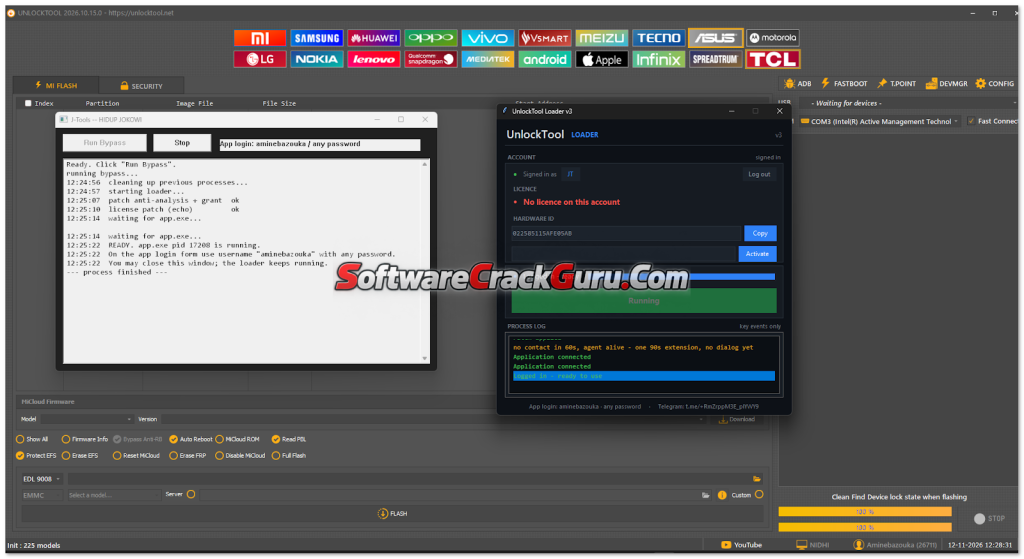
No, it does not require any HWID registration or PC binding. Simply run the loader as administrator, enter the provided username (aminebazouka) with any random password, and log in directly.
3. Which Android and Samsung One UI versions are supported?
Unlock Tool V2026.10.15.0 supports the latest Android 15, Android 16, and Android 17 operating systems. It is also fully compatible with Samsung One UI up to version 9.0, including expanded support for One UI 8.5 and security patches up to September 2026.
4. Can I remove Samsung FRP without enabling ADB mode?
Yes, the updated Auto 1-Click FRP feature allows you to bypass Google Factory Reset Protection (FRP) on supported Samsung Exynos devices directly through Download/Odin Mode without needing ADB.
5. Why does Windows Defender detect the loader as a virus?
Because third-party bypass loaders modify local server connections to activate the software without an official license, Windows Defender and antivirus programs often flag them as false positives. You should temporarily disable real-time protection or exclude the tool folder before extracting and running it.
6. What brands are supported in this version?
Alongside extensive support for Samsung (Exynos and Qualcomm), this FRP MDM free tool includes dedicated servicing modules for Xiaomi, Oppo, Vivo, and other Qualcomm-based Android smartphones.
How to Install & Use Unlock Tool V2026.10.15.0
Follow these step-by-step instructions carefully to run this FRP MDM free tool on your Windows PC:
- Download & Extract: Download the setup archive from the link below and extract it using WinRAR or 7-Zip.
- Disable Antivirus (Temporarily): Because loader tools modify local server connections, Windows Defender may flag the file. Temporarily pause real-time protection or add the extracted folder to exclusions.
- Run the Loader: Open the extracted folder, right-click on
J-Tools -- HIDUP JOKOWI-CLICK_ME_PLEASE.exe, and select Run as administrator. - Activate Bypass: A command prompt window will appear. Click the Run Bypass button to clear background processes and initialize the server.
- Launch Application: In the UnlockTool Loader interface, click Start Application. (If Windows Firewall or Defender prompts for permission, click Yes/Allow).
- Login to Dashboard: Once the login screen loads, enter the following credentials:
- Username:
aminebazouka - Password: (Enter any random password)
- Username:
- Start Servicing: Click Login, wait for the main dashboard to load, and begin your FRP, MDM, or flashing tasks.
File Information & Download Link
- Tool Name: Unlock Tool V2026.10.15.0 (JTools Loader)
- Category: FRP & MDM Free Tool / Mobile Flashing Utility
- Supported OS: Windows 10 / Windows 11 (64-bit recommended)
- License: Free (No Activation / No HWID)